

Biome v1.6




使用以下命令更新 Biome:
¥Update Biome using the following commands:
npm install --save-dev --save-exact @biomejs/biome@latestnpx @biomejs/biome migrate部分支持 Astro、Svelte 和 Vue 文件
Section titled “部分支持 Astro、Svelte 和 Vue 文件”¥Partial support for Astro, Svelte and Vue files
在此版本中,我们很高兴地提供对 Astro、Svelte 和 Vue 文件的部分支持。部分支持意味着什么?
¥In this release, we’re happy to provide partial support for Astro, Svelte and Vue files. What does partial support mean?
虽然团队正在为类似 HTML 的语言开发 统一数据结构,但我们发现只需进行一些更改,就可以为这些文件提供 Biome 功能,尽管存在一些限制。
¥While the team is working on a unified data structure for HTML-ish languages, we discovered that we could provide Biome functionalities to those files with just a few changes, albeit with some limitations.
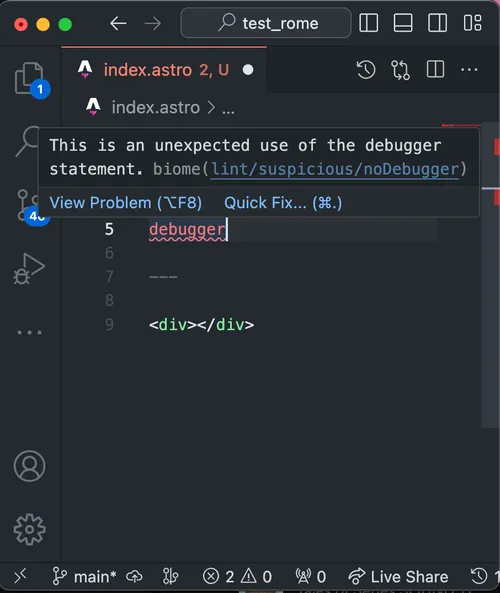
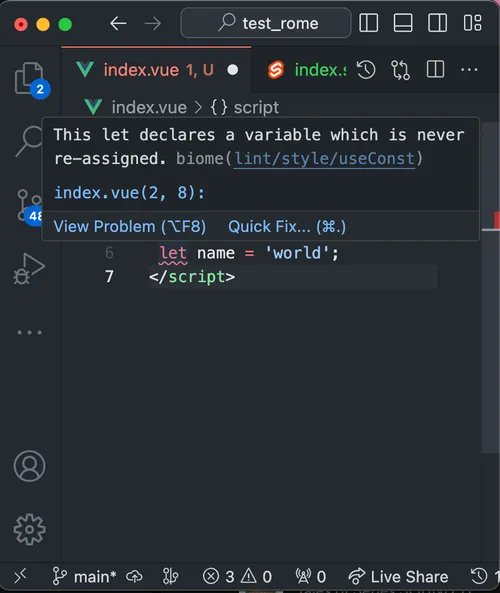
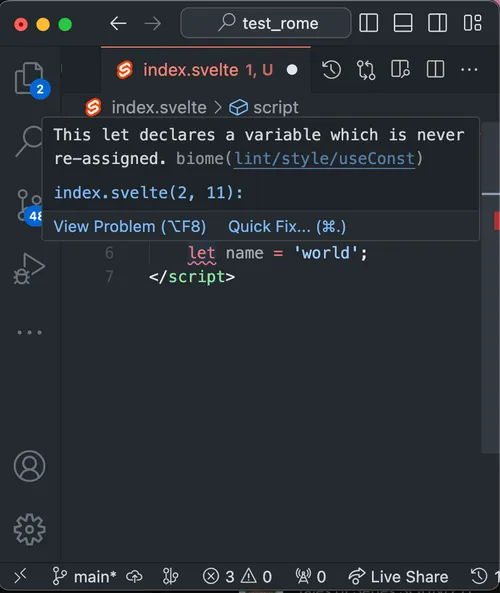
这意味着 Biome 能够分析所述文件的 JavaScript/TypeScript 部分,并且所有功能都可用:格式化、代码检查和导入排序!以下是你在开发体验方面可以期待的内容示例:
¥This means that Biome is able to analyze the JavaScript/TypeScript portion of said files, and all features are available: formatting, linting and import sorting! Here’s an example of what you should expect in terms of developer experience:
请务必阅读 预期和限制的文档。
¥Make sure to read the documentation about expectations and limitations.
配置,更轻量级,更强大
Section titled “配置,更轻量级,更强大”¥Configuration, lighter and more powerful
支持 biome.jsonc
Section titled “支持 biome.jsonc”¥Support for biome.jsonc
Biome 现在接受 biome.jsonc 文件作为配置!你可以根据需要添加任何注释。
¥Biome now accepts the biome.jsonc file as configuration! You can insert all the comments you want in there.
extends 解析依赖
Section titled “extends 解析依赖”¥extends resolves dependencies
从这个版本开始,Biome 可以使用 extends 属性来解析已安装依赖中的其他配置文件。
¥From this version, Biome can use the extends property to resolve other configuration files that are inside installed dependencies.
要使配置可被发现,需要执行几个重要步骤。该文件必须从 "module" 包中导出,并且应该像这样在你的 package.json 中导出:
¥There are few important steps in order to make the configuration discoverable. The file must be exported from a "module" package, and the file should be exported in your package.json like this:
{ "name": "@shared-configs", "type": "module", "exports": { "./biome": "./biome.json" }}此设置允许公开指定符 @shared-configs/biome,你可以在 biome.json 文件中使用它。
¥This set up allows to expose a specifier @shared-configs/biome, which you use inside your biome.json file.
{ "extends": ["@shared-configs/biome"]}依赖的解析由 oxc-resolver 库提供支持,oxc-resolver 是 OXC 项目 提供的众多库之一。它经过实战检验,符合规范!
¥The resolution of the dependencies is powered by the library oxc-resolver, one of the many libraries provided by the OXC project. It’s battle-tested and spec compliant!
减少内存占用
Section titled “减少内存占用”¥Reduced memory footprint
我们将配置文件的大小减少了 6.5 倍!此更改可能不会对程序速度产生显著影响,但可以大幅降低运行 CLI 或 LSP 时的内存使用量。
¥We reduced the size our configuration by a factor of 6.5! This change might not have massive effects on the speed of the program, but it greatly reduced the memory used when running the CLI or the LSP.
新增格式化选项
Section titled “新增格式化选项”¥New formatting options
除了修复之外,格式化程序还提供了两个新选项,可以提高与 Prettier 的兼容性。
¥Other than fixes, the formatter provides two new options that should improve the compatibility with Prettier.
选项 attributePosition
Section titled “选项 attributePosition”¥Option attributePosition
当 formatter.attributePosition 的值为 multiline 时,所有属性类似 HTML 的语言(截至撰写本文时为 JSX/TSX)无论行号多少都会折叠成多行显示:
¥When formatter.attributePosition has the value multiline, all attributes of HTML-ish languages (JSX/TSX as for time of writing) will be collapsed on multiple lines regardless of their numbers:
With variant auto (default)
属性会自动格式化,并且仅当满足特定条件时才会折叠成多行。¥
With variant auto (default)
The attributes are automatically formatted, and they will collapse in multiple lines only when they hit certain criteria.<Button as="link" style="primary" href="https://example.com"> Hit me</Button>With variant multiline
无论如何,属性始终格式化为多行。¥
With variant multiline
The attributes are always formatted on multiple lines, regardless.<Button as="link" style="primary" href="https://example.com"> Hit me</Button>贡献者 @octoshikari 自行实现了此新功能!非常感谢你对 Biome 项目的帮助。
¥The contributor @octoshikari implemented this new feature by themselves! Huge thank you for helping the Biome project.
选项 json.formatter.trailingCommas
Section titled “选项 json.formatter.trailingCommas”¥Option json.formatter.trailingCommas
之前,Biome 解析器引入了一个选项,允许解析包含尾随逗号的 JSON 和 JSONC 文件。这样做是为了缓解其他默认允许尾随逗号的工具(例如 VSCode、Prettier 等)带来的不便。
¥Previously, Biome parser introduced an option that would allow to parse JSON and JSONC files that contained a trailing comma. This was required to ease the friction caused by other tools that tolerate trailing commas by default (e.g. VSCode, Prettier, etc.).
遗憾的是,我们的格式化程序在这方面不够宽容。在这个版本中,我们引入了 json.formatter.trailingCommas 选项。它允许你应用与 js.formatter.trailingComma 相同的规则。
¥Unfortunately, our formatter wasn’t as tolerant. But with this release, we’ve introduced the option json.formatter.trailingCommas. It allows you to apply the same rules as with js.formatter.trailingComma.
With variant none (default)
格式化程序会在格式化时删除尾随逗号。¥
With variant none (default)
The formatter removes the trailing comma upon formatting.{ "lorem": "ipsum", "lorem": "ipsum", "lorem": "ipsum", "lorem": "ipsum_last"}With variant all
格式化程序会在格式化时添加尾随逗号。¥
With variant all
The formatter adds the trailing comma upon formatting.{ "lorem": "ipsum", "lorem": "ipsum", "lorem": "ipsum", "lorem": "ipsum_last",}更轻松地从……迁移更美观
Section titled “更轻松地从……迁移更美观”¥Easier migration from Prettier
此版本引入了一个名为 biome migrate prettier 的新命令。此命令将读取你的 Prettier .prettierrc/prettier.json 和 .prettierignore,并尝试将其选项和通配符移植到 Biome。
¥This release introduces a new command called biome migrate prettier. This command will read your Prettier .prettierrc/prettier.json and .prettierignore, and attempt to port its options and globs in Biome.
给定一个 prettier.json 文件,Biome 将修改现有配置文件以匹配 Prettier 的选项:
¥Given a prettier.json file, Biome will modify the existing configuration file to match Prettier’s options:
{ "useTabs": false, "semi": true, "singleQuote": true }{ "formatter": { "enabled": true, "formatWithErrors": false, "indentStyle": "space", "indentWidth": 2, "lineEnding": "lf", "lineWidth": 80, "attributePosition": "auto" }, "linter": { "enabled": true }, "javascript": { "formatter": { "jsxQuoteStyle": "double", "quoteProperties": "asNeeded", "trailingCommas": "all", "semicolons": "always", "arrowParentheses": "always", "bracketSpacing": true, "bracketSameLine": false, "quoteStyle": "single", "attributePosition": "auto" } }}Linter
Section titled “Linter”¥Promoted rules
新规则在 nursery 组中进行孵化。一旦稳定下来,我们就将它们提升为稳定规则。以下规则已推广:
¥New rules are incubated in the nursery group. Once stable, we promote them to a stable group. The following rules are promoted:
此外,现在建议遵守以下规则:
¥Additionally, the following rules are now recommended:
¥Removed rules
-
移除
nursery/useGroupedTypeImport。规则 style/useImportType 涵盖了此规则的行为。¥Remove
nursery/useGroupedTypeImport. The rule style/useImportType covers the behavior of this rule.
¥New rules
新规则现已推出:
¥New rules are now available:
¥Miscellaneous
-
我们大幅减少了受保护文件的数量,这意味着你现在可以使用 Biome 格式化
package.json、tsconfig.json等文件。锁定文件仍然被视为受保护的文件。¥We drastically reduced the number of protected files, which means you can now format your
package.json,tsconfig.json, etc. with Biome. Lock files are still considered protected. -
CLI 现在能够更好地报告文件总数和实际更改的文件数。
¥The CLI now does a better job at reporting the total number of files and the files that were really changed.
-
当诊断信息在终端中显示与编辑器集成的文件名时,你可以点击该文件名,编辑器会自动打开该文件。
¥When a diagnostic shows a file name on the terminal that is integrated with your editor, you can click it and the editor will open the file for you.
-
命令
biome rage现在接受两个实用选项:--formatter和--linter。¥The command
biome ragenow accepts two nice options:--formatterand--linter. -
我们移除了运行
biome check命令时一些多余的错误诊断信息。¥We removed some superfluous error diagnostic when running the
biome checkcommand.
Biome v2.1 中文网 - 粤ICP备13048890号