

Biome v1.9 周年纪念版




今天,我们激动地宣布 Biome v1.9 正式发布,并庆祝 Biome 一周年!🎊 让我们回顾一下 Biome 的第一年,然后探索 Biome 1.9 中的新功能。
¥Today we’re excited to announce the release of Biome v1.9 and to celebrate the first anniversary of Biome 🎊 Let’s take a look back at the first year of Biome and then explore the new features in Biome 1.9.
Biome 一周年纪念
Section titled “Biome 一周年纪念”¥One year of Biome
我们将于 2023 年 8 月 29 日正式发布 已发布的 Biome 版本。Biome 自诞生以来一直是一款由社区驱动的免费开源软件。我们拥有一个 governance 文件和一个强大的贡献者团队,以确保项目的长期发展。
¥We officially announced Biome on 29 August 2023. From its inception, Biome has been a free open source software driven by its community. We have a governance and a solid base of contributors to ensure the longevity of the project.
2023 年 10 月,Prettier 的创建者之一推出了 Prettier 挑战 奖项,奖励任何用 Rust 编写的、通过至少 95% Prettier JavaScript 测试的项目。此挑战的目标是创建一个能够与 Prettier 匹敌的快速替代方案,以促进 Prettier 性能的提升。我们迅速调整工作,力求尽快完成。到 11 月底,我们凭借 已超越此目标 的出色表现,成功通过了 97% 的 Prettier JavaScript 测试,以及 TypeScript、JSX 和 TSX 测试!Biome 格式化程序速度非常快:它可以在不到 1 秒的时间内格式化大型代码库。在此过程中,我们发现了 Prettier 中的几个格式化问题。此修复程序还为 Prettier 带来了贡献,极大地提升了其性能。这项挑战对整个 Web 生态系统来说是一项胜利!
¥In October 2023, one of the creators of Prettier launched the Prettier challenge that rewarded any project written in Rust that passes at least 95% of the Prettier tests for JavaScript. The aim of this challenge was to create a fast competitor to Prettier in order to stimulate improvements in Prettier’s performance. We quickly organized ourselves to get there as soon as possible. By the end of November, we surpassed this goal by passing 97% of the Prettier tests for JavaScript, as well as TypeScript, JSX and TSX! The Biome formatter is really fast: it can format a large code base in less than 1 second. In the process, we identified several formatting issues in Prettier. This has also pushed contributions to Prettier that greatly improved its performance. This challenge was a win for the whole web ecosystem!
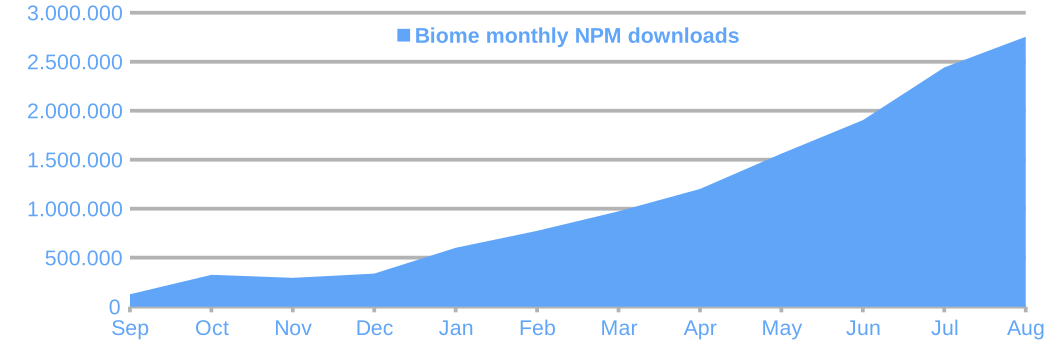
通过赢得挑战,我们让 Biome 重见天日。许多开发者欣喜地发现,它不仅是一个速度快的 Prettier 替代方案,也是一个速度快的 ESLint 替代方案!将格式化程序和代码检查器打包在一个工具中的方法,只需最少的配置即可提供统一且一致的体验。Biome 已被众多项目迅速采用,其中包括 Ant Design、Astro、Sentry、DaisyUI、Refine、Discord、Pulumi、Label Studio、Spicetify、Apify、Slint、Rspack、FluidFramework 和 和其他 等大型项目。Biome 在 2024 年 8 月的 NPM 月下载量突破 270 万次。
¥By winning the challenge, we brought Biome to light. Many developers were excited to discover a fast alternative to Prettier, but also a fast alternative to ESLint! The approach of bundling both a formatter and a linter in one tool provides a unified and consistent experience with minimal configuration. Biome has been quickly adopted by many projects, including big ones such as Ant Design, Astro, Sentry, daisyUI, Refine, Discord, Pulumi, Label Studio, Spicetify, Apify, Slint, Rspack, FluidFramework, and others. Biome surpassed 2.7 million monthly NPM downloads in August 2024.
我们获得了赞助,包括 Shiguredo、l2BEAT、Phoenix Labs、KANAME、Nanabit、Vital、CodeRabbit 和 Forge42。这些赞助通过奖励贡献者,甚至在最近几个月支付维护工作费用,帮助推动了项目的发展。我们希望奖励和鼓励更多贡献,如果你使用 Biome,请考虑加入 赞助我们!
¥We gained sponsorship, notably Shiguredo, l2BEAT, Phoenix Labs, KANAME, Nanabit, Vital, CodeRabbit, and Forge42. These sponsorships have helped move the project forward by rewarding contributors and even paying for maintenance work in recent months. We would like to reward and encourage more contributions, then if you use Biome, please consider sponsoring us!
我们也迎来了许多新的贡献者。做出重大贡献的贡献者将定期受邀加入 Biome 团队。我们最初由 5 位核心贡献者组成团队,现在我们只有 8 位核心贡献者和 10 位维护者 位成员。
¥We also gained many new contributors. Contributors who have made a significant contribution are regularly invited to join the Biome team. We started with a team of 5 core contributors, and we are now a team of 8 core contributors and 10 maintainers.
2024 年 6 月,Biome 项目赢得了 JSNation 生产力提升开源奖 奖项。
¥In June 2024, Biome won the JSNation’s productivity booster Open Source Award.
Biome v1.9
Section titled “Biome v1.9”值此 Biome 一周年之际,我们很高兴地宣布发布 Biome 1.9 版本,该版本带来了许多新功能和错误修复。
¥As we celebrate Biome’s first year, we’re pleased to announce the release of Biome 1.9, which brings many new features and bug fixes.
升级到 Biome v1.9.0 后,运行 migrate 命令将 Biome 配置迁移到新版本:
¥Once you have upgraded to Biome v1.9.0, migrate your Biome configuration to the new version by running the migrate command:
biome migrate --write稳定的 CSS 格式化程序和代码检查器
Section titled “稳定的 CSS 格式化程序和代码检查器”¥Stable CSS formatter and linter
我们激动地宣布 Biome 的 CSS 格式化程序和代码检查器现已稳定,并默认启用。请注意,Biome 目前仅解析标准 CSS 语法,尚不支持 SCSS 等 CSS 方言。由于这是一项全新的功能,你可能仍然会遇到一些问题。请报告你遇到的任何问题!
¥We are thrilled to announce that Biome’s CSS formatter and linter are now considered stable and are enabled by default. Do note that Biome only parses standard CSS syntax so far, and doesn’t yet handle CSS dialects such as SCSS. As this is brand new functionality, you may also still run into some rough edges. Please report any problems you encounter!
CSS 代码检查器提供 15 条稳定的代码检查规则,这些规则是从 stylelint 移植过来的:
¥The CSS linter provides 15 stable lint rules that were ported from stylelint:
它还提供以下初始代码检查规则:
¥It also provides the following nursery lint rules:
如果你不希望 Biome 格式化和检查你的 CSS 文件,可以在 Biome 配置文件中禁用 CSS 格式化和检查功能:
¥If you don’t want Biome to format and lint your CSS files, you can disable the CSS formatter and linter in the Biome configuration file:
{ "css": { "formatter": { "enabled": false }, "linter": { "enabled": false } }}或者在命令行中使用:
¥or on the command line:
biome format --css-formatter-enabled=falsebiome lint --css-linter-enabled=falsebiome check --css-formatter-enabled=false --css-linter-enabled=false特别感谢 Denis Bezrukov @denbezrukov、Jon Egeland @faultyserver 和 Yoshiaki Togami @togami2864 协调并实现了大部分与 CSS 相关的功能。
¥Special thanks to Denis Bezrukov @denbezrukov, Jon Egeland @faultyserver and Yoshiaki Togami @togami2864 for coordinating and implementing most of the features related to CSS.
稳定的 GraphQL 格式化程序和代码检查器
Section titled “稳定的 GraphQL 格式化程序和代码检查器”¥Stable GraphQL formatter and linter
另一个全新功能:Biome 现在默认格式化并检查 GraphQL 文件。
¥Another brand new feature: Biome now formats and lints GraphQL files by default.
目前,Biome 仅提供两条基础代码检查规则:
¥For now, Biome provides only two nursery lint rules:
如果你不希望 Biome 格式化和检查你的 GraphQL 文件,可以在 Biome 配置文件中禁用 GraphQL 格式化和检查功能:
¥If you don’t want Biome to format and lint your GraphQL files, you can disable the GraphQL formatter and linter in the Biome configuration file:
{ "graphql": { "formatter": { "enabled": false }, "linter": { "enabled": false } }}或者在命令行中使用:
¥or on the command line:
biome format --graphql-formatter-enabled=falsebiome lint --graphql-linter-enabled=falsebiome check --graphql-formatter-enabled=false --css-linter-enabled=false特别感谢 Swan 资助 GraphQL 格式化程序的实现,感谢 Võ Hoàng Long @vohoanglong0107 实现了大部分与 GraphQL 相关的功能。
¥Special thanks to Swan that funded the implementation of the GraphQL formatter and to Võ Hoàng Long @vohoanglong0107 for implementing most of the features related to GraphQL.
¥Search command
今年二月,我们的一位核心贡献者发布了 插件支持提案。其中一个亮点是,我们使用 GritQL 作为插件系统的基础。
¥Back in February, one of our Core Contributors published a proposal for plugin support. One of the highlights was the use of GritQL as a foundation for our plugin system.
GritQL 是一种强大的查询语言,允许你对代码库进行结构化搜索。这意味着在搜索查询中,空格甚至字符串引号的类型等细节都将被忽略。它也提供了许多用于查询代码结构的功能,使其在代码搜索方面比正则表达式更加优雅。
¥GritQL is a powerful query language that lets you do structural searches on your codebase. This means that trivia such as whitespace or even the type of string quotes used will be ignored in your search query. It also has many features for querying the structure of your code, making it much more elegant for searching code than regular expressions.
集成 GritQL 等查询语言并非易事,我们在这一年中发布了 multiple、status 和 updates。今天,我们发布了这项工作的首个成果:新的 biome search 命令。
¥Integrating a query language such as GritQL is no easy feat, and throughout the year we published multiple status updates. Today, we release the first product of this effort: A new biome search command.
我们相信这条命令在某些情况下可能对用户有用(尤其是在集成到我们的 IDE 扩展程序中时!),但这条命令实际上是我们插件开发工作的垫脚石。通过允许用户在第一个版本中进行试用,我们希望了解你想要执行的查询类型,以及我们需要重点关注的错误。
¥While we believe this command may already be useful to users in some situations (especially when it gets integrated in our IDE extensions!), this command is really a stepping stone towards our plugin efforts. By allowing our users to try it out in a first iteration, we hope to gain insight into the type of queries you want to do, as well as the bugs we need to focus on.
目前,由于许多限制尚待修复或探索,search 命令被明确标记为“实验性”。尝试时请记住这一点,并请告诉我们你的想法!如需了解具体限制,请参阅 专用问题。
¥For now, the search command is explicitly marked as EXPERIMENTAL, since many limitations are yet to be fixed or explored. Keep this in mind when you try it out, and please let us know what you think!
For an overview of specific limitations, please see the dedicated issue.
尽管仍然存在许多限制,但我们相信集成工作已经取得了足够的进展,我们可以将重点转移到实际插件的集成上。我们目前还无法承诺具体的时间表,但我们会随时更新最新进展!
¥Even though there are still plenty of limitations, we do believe the integration has progressed far enough that we can shift our focus towards the integration of actual plugins. We cannot yet promise a timeline, but we’ll keep you posted!
PS.:GritQL 使用反引号转义代码片段,但大多数 shell 将反引号解释为命令调用。为避免这种情况,最好在 Grit 查询周围加上单引号。例如,以下命令会搜索所有 console.log 调用:
¥PS.: GritQL escapes code snippets using backticks, but most shells interpret backticks as command invocations. To avoid this, it’s best to put single quotes around your Grit queries. For instance, the following command search for all console.log invocations:
biome search '`console.$method($args)` where { $method <: or { `log`, `info` } }' ././benchmark/bench.js:38:3 search ━━━━━━━━━━━━━━━━━━━━━━━━━━━━━━━━━━━━━━━━━━━━━━━━━━━━━━━
38 │ console.info(`\n⌛ repository: ${name}`);
./packages/@biomejs/js-api/scripts/update-nightly-version.mjs:27:1 search ━━━━━━━━━━━━━━
27 │ console.log(`version=${version}`);
Searched 67 files in 1034ms. Found 2 matches.
特别感谢 Grit 开源 GritQL,感谢 Arend van Beelen @arendjr 将 GritQL 引擎集成到 Biome 中,感谢 @BackupMiles 在 biome search 命令中实现了搜索结果的格式化!
¥Special thanks to Grit for open-sourcing GritQL, Arend van Beelen @arendjr for integrating the GritQL engine into Biome, and to @BackupMiles for implementing the formatting of search results in the biome search command!
.editorconfig 支持
Section titled “.editorconfig 支持”¥.editorconfig support
Biome 现在能够将你项目的 .editorconfig 版本纳入考虑范围。这是一个可选功能。你需要在 Biome 配置文件中启用它:
¥Biome is now able to take the .editorconfig of your project into account. This is an opt-in feature. You have to turn it on in your Biome configuration file:
{ "formatter": { "useEditorconfig": true }}请注意,Biome 配置文件中指定的所有选项都会覆盖 .editorconfig 中指定的选项。目前,仅考虑项目根目录下的 .editorconfig 文件。
¥Note that all options specified in the Biome configuration file override the ones specified in .editorconfig. For now, only the .editorconfig at the root of your project is taken into account.
特别感谢 Carson McManus @dyc3 实现了此功能!
¥Special thanks to Carson McManus @dyc3 for implementing this feature!
JavaScript 格式化和代码检查器
Section titled “JavaScript 格式化和代码检查器”¥JavaScript formatter and linter
我们已更新 JavaScript 格式化程序以匹配 Prettier v3.3。最重要的变化是在三元运算符中,空值合并操作周围添加了括号。此更改使运算符优先级更加清晰。
¥We updated the JavaScript formatter to match Prettier v3.3. The most significant change is adding parentheses around nullish coalescing in ternaries. This change adds clarity to operator precedence.
// Inputfoo ? bar ?? foo : baz;
// Biome 1.8.3 and Prettier 3.3.2foo ? bar ?? foo : baz;
// Biome 1.9 and Prettier 3.3.3foo ? (bar ?? foo) : baz;关于代码检查器,我们稳定了以下代码检查规则:
¥Regarding the linter, we stabilized the following lint rules:
我们新增了以下规则:
¥We added the following new rules:
我们已弃用以下规则:
¥And we deprecated the following rules:
-
correctness/noInvalidNewBuiltin。请改用 correctness/noInvalidBuiltinInstantiation。¥
correctness/noInvalidNewBuiltin. Use correctness/noInvalidBuiltinInstantiation instead. -
style/useSingleCaseStatement。请改用 correctness/noSwitchDeclarations。¥
style/useSingleCaseStatement. Use correctness/noSwitchDeclarations instead. -
suspicious/noConsoleLog。请改用 suspicious/noConsole。¥
suspicious/noConsoleLog. Use suspicious/noConsole instead.
我们的代码检查器现在拥有超过 250 条规则!大部分 ESLint 规则和一些插件的规则已移植。我们即将完成 ESLint 的移植工作。
¥Our linter has now more than 250 rules! Most of the ESLint rules and rules from some plugins have been ported. We are close to completing the port of ESLint.
¥And more!
完整的变更列表请参阅我们的 changelog 文件。
¥For the full list of changes, please refer to our changelog.
下一步是什么?
Section titled “下一步是什么?”¥What’s next
VS Code 插件 v3
Section titled “VS Code 插件 v3”¥VSCode plugin v3
Nicolas Hedger @nhedger 正在我们第一方 VSCode 插件的新版本中开发。此新版本将改进工作区支持并修复一些长期存在的问题。
¥Nicolas Hedger @nhedger is working on a new version of our first-party VSCode plugin. This new version will improve workspace support and fix some long-standing issues.
Biome 2.0
Section titled “Biome 2.0”在第一年中,我们发现了一些问题,这些问题无法在不引入一些小的重大更改的情况下解决。例如,我们依赖于一个 glob 库,该库有时不会按用户预期运行。我们认为现在是时候解决这些长期存在的问题了。根据 版本控制理念 的说明,这些小的重大变更必须通过发布主要版本才能实现。因此,Biome 的下一个版本将是一个主要版本:Biome 2.0。我们将借此机会移除已弃用的功能。我们将使用 biome migrate 命令来简化迁移过程。
¥During this first year, we have discovered a number of issues that cannot be solved without introducing small breaking changes. For example, we rely on a glob library that sometimes doesn’t behave as users expect. We feel it is time to address these long-standing issues. Following our versioning philosophy, these small breaking changes cannot be made without releasing a major release. Therefore, the next release of Biome will be a major release: Biome 2.0. We will use this opportunity to remove deprecated features. We will make the migration smooth by using the biome migrate command.
Biome v2.1 中文网 - 粤ICP备13048890号